
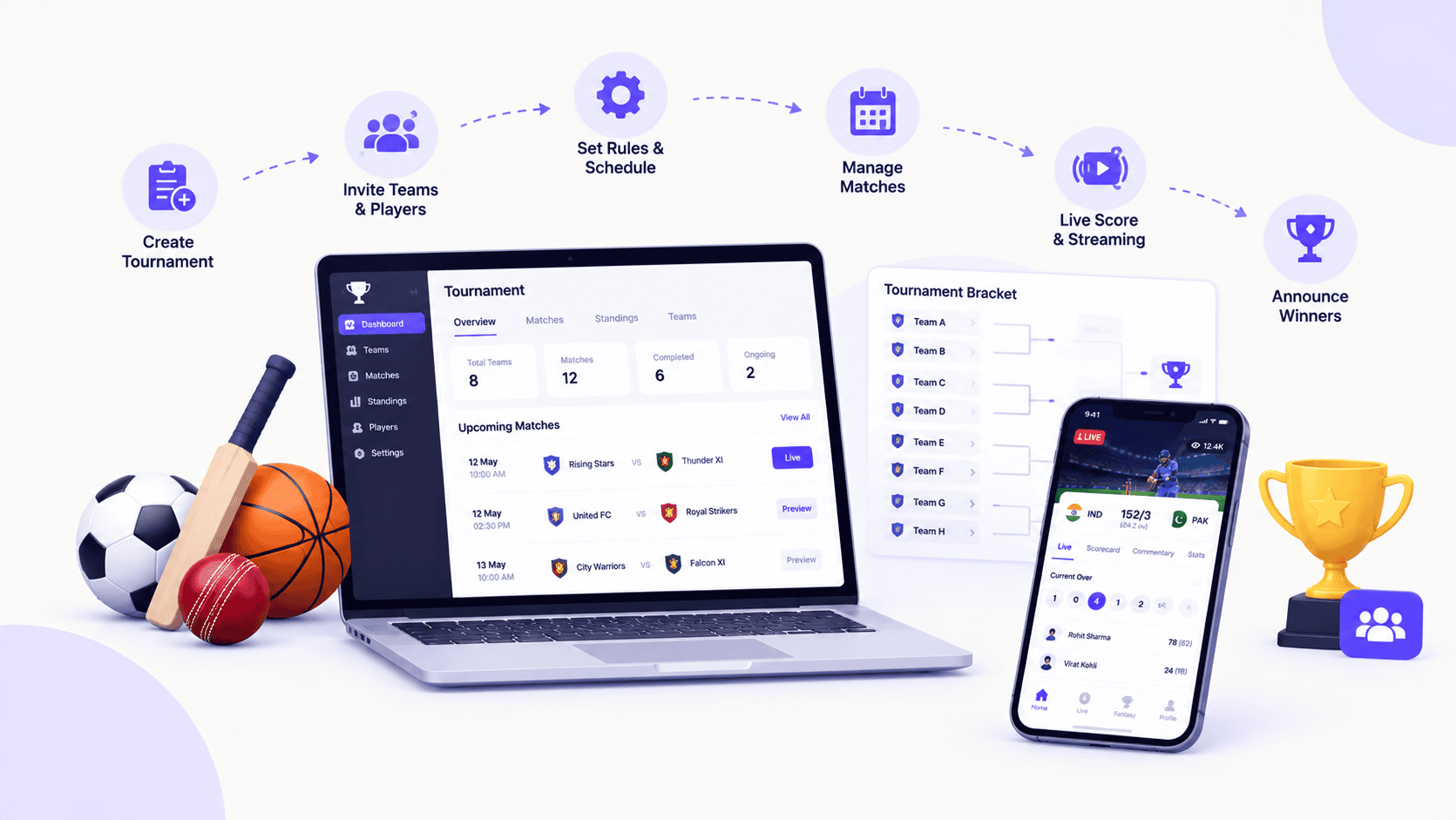
What if your next big sports tournament could attract players from across the country, engage thousands of fans, and grow into a thriving sports community? You do not need a massive stadium, a large organizing team, or an enormous budget to make it happen. With the right idea, a smart strategy, and the power of digital technology, you can turn a simple competition into an exciting sporting experience.
But here is where many organizers get it wrong: a great tournament is not built on competition alone. It takes the right format, a seamless registration process, well-planned fixtures, fair scoring, and a strategy that keeps participants coming back for more.
Whether you are launching an esports championship, organizing a virtual chess competition, or managing a traditional sports tournament online, this guide will show you how to turn your idea into a well-organized, engaging, and potentially profitable event.
What Is an Online Sports Tournament?
An online sports tournament is a competition organized and managed through digital tools that help participants register, view match schedules, follow results, and compete under predefined rules.
The term can describe two different tournament models. In a fully online tournament, participants compete remotely, as in esports, online chess, or virtual sports games. In a digitally managed physical tournament, athletes play at real-world venues while organizers use online systems to handle registration, fixtures, scores, standings, and communication.
For example, a cricket club can organize a local competition on physical grounds while publishing fixtures and live scores online. Similarly, a gaming community can host a FIFA or eFootball tournament in which participants play remotely and submit match results through a digital platform.
The essential difference is where participants compete, not whether organizers use technology.
Why Start an Online Sports Tournament?
Online tournament organization makes competitions easier to access, manage, and promote. Instead of relying entirely on manual processes, organizers can use digital tools to simplify administrative work and keep participants informed.
Reach more participants. Online registration and tournament pages make it easier for players and teams to discover and join competitions.
Reduce administrative work. Digital registration, automatic fixture generation, and centralized result management reduce repetitive tasks.
Improve transparency. Published rules, brackets, schedules, and standings help participants understand how the competition progresses.
Create better spectator experiences. Live score updates, match statistics, and shareable tournament pages help fans follow the action.
Build recurring revenue opportunities. Depending on the tournament model, organizers may generate income through registration fees, sponsorships, advertising, or premium access.
These benefits depend on the quality of the tournament setup and the tools used. A digital platform helps organize a competition, but clear rules, fair decisions, and effective communication remain essential.
How to Start an Online Sports Tournament: 10 Essential Steps
Step 1: Choose your sport and tournament concept
Start by defining what kind of competition you want to organize. Your sport, target audience, competition level, and delivery model will influence almost every decision that follows.
Decide whether you want to organize an esports competition, an online chess tournament, a digitally managed cricket or football event, or a multi-sport competition.
Identify your audience as well. You could target school students, university clubs, amateur athletes, professional teams, gaming communities, or corporate employees.
Practical tip: Start with one clearly defined audience and one primary sport. A focused tournament is generally easier to promote and manage than a large event with multiple unrelated competitions.
Step 2: Set your tournament goals and budget
Decide what success means before you begin spending money. You might want to build a sports community, attract new members to a club, promote a brand, generate revenue, or test a new tournament format.
Next, estimate the costs. A physical tournament may require venue rental, referees, equipment, medical support, trophies, and insurance. A remote esports tournament may require tournament software, moderation, streaming, technical support, and prizes.
Include marketing, payment-processing charges, and a contingency reserve in your budget.
If you plan to charge an entry fee, calculate your break-even point before opening registration.
Example: If your estimated costs are $600 and the entry fee is $30 per team, you need 20 paying teams to cover those costs, assuming no additional income or per-team expenses.
Step 3: Choose the right tournament format
Your tournament format determines how participants compete, how many matches take place, and how the winner is decided.
Single elimination: A participant or team leaves the tournament after one loss. This format suits short events with limited time.
Double elimination: Participants generally need to lose twice before being eliminated. It provides a second chance but requires more matches.
Round robin: Every participant or team plays every other participant or team. It is suitable for smaller competitions where everyone should receive multiple opportunities to compete.
Group stage followed by knockout: Participants first compete in groups, and the top performers advance to elimination rounds. This works well for larger tournaments.
Swiss system: Participants play a fixed number of rounds against opponents with similar results. It is commonly used in chess and esports competitions.
Choose the format based on your number of participants, available time, match duration, and desired competitive experience.
Step 4: Establish clear rules and eligibility requirements
Write the rules before registration begins. Participants should understand exactly how the tournament works before committing to it.
Specify age groups, skill levels, team sizes, roster limits, match duration, scoring rules, tiebreakers, and player eligibility. For remote competitions, explain how participants connect, verify results, handle disconnections, and report technical problems.
You should also establish policies for late arrivals, forfeits, substitutions, misconduct, protests, and disputes.
If prizes or entry fees are involved, publish the payment, refund, and prize-distribution policies. Check the applicable local laws, platform rules, and age-related requirements before launching the event.
Practical tip: Keep the rules accessible on the tournament page so participants can review them without contacting an organizer.
Step 5: Select an online tournament management platform
The right platform helps you manage the competition from registration through the final result. Choose based on your actual workflow rather than the number of features advertised.
Look for online registration, team and player management, bracket generation, fixture scheduling, result entry, live standings, notifications, and mobile-friendly tournament pages.
If you plan to host multiple events, additional features such as participant databases, reusable tournament templates, role-based permissions, statistics, and reporting may be useful.
For smaller competitions, a basic bracket tool and a registration form may be sufficient. Larger tournaments often benefit from a dedicated sports tournament management system that connects these activities in one place.
Before choosing a platform, test how it handles registrations, match changes, score updates, and participant communication.
Step 6: Create your tournament page and open registration
Your tournament page acts as the main information hub for participants. It should explain what the competition is, who can join, when it takes place, and how registration works.
Include the tournament name, description, dates, format, eligibility rules, entry fees, prizes, registration deadline, contact information, and links to the official rules.
For team competitions, collect the team name, captain’s contact details, roster information, and other necessary eligibility details. For individual competitions, collect participant information relevant to the sport.
Set a registration deadline and decide whether entries are approved automatically or reviewed manually. If spaces are limited, publish the maximum number of participants and explain how a waiting list works.
Practical tip: Keep registration simple. Ask for the information you actually need, and provide a clear confirmation once an entry is accepted.
Step 7: Generate fixtures and publish the schedule
Once registration closes, finalize the participant list and generate the match schedule.
A fixture generator can create pairings or brackets based on your selected tournament format. Review the generated schedule to identify conflicts, uneven rest periods, unavailable participants, and overlapping venue assignments.
For physical tournaments, account for court or field availability, referee assignments, travel time, and match duration. For remote competitions, establish match windows and deadlines for reporting results.
Publish the schedule in a format participants can access easily. Include match times, opponents, match identifiers, venue or connection details, and instructions for reporting results.
Practical tip: Announce a schedule publication date in advance. If fixtures must change, communicate updates through an official channel rather than relying on scattered messages.
Step 8: Manage matches and update results
On tournament day, the priority is to keep matches running smoothly and make results available as soon as they are verified.
Assign match officials or coordinators where necessary. Explain who can submit scores, who approves them, and how participants can challenge an incorrect result.
Use a centralized scoring system to record completed matches and update brackets, standings, and leaderboards. For remote tournaments, specify whether players must submit screenshots, match IDs, replays, or other evidence when results are disputed.
Keep a record of corrections and decisions. This helps organizers resolve disagreements consistently and prevents confusion about which result is official.
Practical tip: Assign someone to manage score updates and participant questions, even if you are running a small tournament. This allows the main organizer to focus on the overall event.
Step 9: Promote the tournament and engage participants
A well-organized competition still needs participants. Start promoting your event early through sports clubs, school or university networks, social media, relevant online communities, and partnerships with coaches or local organizations.
Publish clear announcements that explain the sport, competition format, eligibility, prizes, registration deadline, and how to enter.
During the tournament, keep participants and spectators engaged with fixture announcements, score updates, standings, highlights, interviews, and progress toward the final.
If your budget and audience justify it, consider live streaming, sponsor promotions, or a dedicated results page.
Practical tip: Make every announcement easy to share. A single official tournament link helps prevent outdated schedules and conflicting information from circulating.
Step 10: Announce winners and evaluate performance
After the final match, publish the confirmed results, final standings, and prize details. Recognize outstanding participants, thank volunteers and sponsors, and share highlights where appropriate.
Then evaluate the tournament. Review registration numbers, completed matches, disputes, schedule delays, participant feedback, operating costs, and revenue.
Compare actual results with your original goals. Did the event attract the expected number of participants? Were matches completed on time? Did your registration and scoring process work reliably?
Use these findings to improve the next tournament. Save reusable rules, schedules, communication templates, and tournament configurations so you do not have to start from scratch every time.
Which Tournament Format Should You Choose?
The best format depends on the number of participants, the time available, and whether every participant should receive multiple opportunities to compete.
| Tournament format | Best for | Main advantage | Main limitation |
|---|---|---|---|
| Single elimination | Short events | Fast and easy to understand | One loss can end a participant’s run |
| Double elimination | Competitive gaming and selected sports | A second loss is required for elimination | More matches and scheduling complexity |
| Round robin | Small leagues and group competitions | Every participant plays every other participant | Match count increases quickly |
| Group stage + knockout | Medium and large tournaments | Combines group play with high-stakes finals | Requires careful scheduling |
| Swiss system | Chess and esports | Several rounds without a full round robin | Pairings and tiebreakers need careful management |
How many matches will your tournament require?
For a single round-robin tournament with \(n\) participants, where each participant plays every other participant once, the number of matches is:
\[ \text{Matches}=\frac{n(n-1)}{2} \]
For a single-elimination tournament with no third-place match, the number of matches required to determine one champion is:
\[ \text{Matches}=n-1 \]
For example, a single-elimination tournament with 16 teams requires 15 matches. A round-robin tournament with the same 16 teams requires 120 matches.
These calculations help you estimate scheduling requirements before registration opens. If the tournament includes multiple groups, playoffs, placement matches, or multiple games per matchup, calculate those separately.
What Features Should Online Tournament Software Have?
Choosing the right tournament management software can make the difference between a smooth competition and an event that requires constant manual intervention.
Here are the most useful capabilities to consider.
Online registration and participant management
Collect entries, organize teams, maintain rosters, approve applications, and manage participant eligibility from one central location.
Bracket and fixture generation
Generate match pairings based on the tournament format, apply seeding where needed, and make schedule changes without rebuilding everything manually.
Scheduling and notifications
Publish match times, communicate rescheduling decisions, and notify participants about important changes.
Live scoring and standings
Record verified results and display updated brackets, league tables, player statistics, and leaderboards.
Mobile-friendly tournament pages
Let participants and spectators view fixtures and results on their phones without needing to contact organizers for routine updates.
Permissions and result verification
Restrict administrative actions to authorized users, maintain a clear scoring process, and provide a way to review disputed results.
For recurring events or larger competitions, also consider payment integrations, sponsor placements, customizable branding, reporting, data exports, and support for multiple tournaments or divisions.
A simple tournament may not need all these capabilities. Choose a solution that fits your event today while leaving room to grow.
How Much Does It Cost to Start an Online Sports Tournament?
The cost varies considerably depending on the sport, tournament format, number of participants, and whether matches take place online or at a physical venue.
A small online gaming competition may require little more than a tournament platform, moderators, and a prize budget. A physical football or cricket tournament may involve substantial venue, officiating, equipment, and safety costs.
| Expense | What to consider |
|---|---|
| Tournament software | Free tools, subscriptions, or per-event fees |
| Marketing | Social media promotion, creative assets, and advertising |
| Prizes | Cash awards, trophies, medals, or sponsored products |
| Venue and equipment | Fields, courts, lighting, equipment, or connectivity |
| Officials and staff | Referees, coordinators, moderators, and technical support |
| Payment processing | Transaction charges and refund handling |
| Streaming and media | Cameras, streaming tools, production, and internet access |
| Contingency | Unexpected costs, delays, and cancellations |
Can you start an online sports tournament for free?
Yes. You can potentially organize a small tournament using free registration forms, spreadsheets, communication channels, and a free bracket or tournament management tool.
However, free plans may limit participant numbers, branding, automation, payment collection, or advanced scoring features. Check the current terms of any platform before relying on it.
The best approach is to begin with the minimum tools needed to run a fair and reliable competition. Invest in additional features when your participant numbers, workload, or revenue justify the expense.
How to Make Money From an Online Sports Tournament
If you want to turn tournament organization into a sustainable business, build a realistic revenue model around your audience and event costs.
Entry fees. Charge a clearly disclosed registration fee when appropriate. Make sure the amount reflects your costs, competition value, and audience.
Sponsorships. Partner with relevant businesses that want visibility among your participants and spectators. Depending on the agreement, sponsors may support prizes, event costs, or promotional activities.
Advertising. A tournament website, livestream, or results page may provide advertising opportunities when you have a meaningful audience. Revenue will depend on traffic quality, advertiser demand, and platform eligibility.
Premium experiences. Depending on the sport and audience, you could offer optional coaching sessions, advanced statistics, premium viewing experiences, or additional competition categories.
Memberships and recurring leagues. Regular tournaments can encourage participants to join a club, community, or recurring competition program.
The key is to prioritize participant trust. Disclose fees and prize conditions, keep financial records, and avoid promising rewards or outcomes you cannot guarantee.
A Practical Online Sports Tournament Launch Timeline
The amount of preparation required depends on the event’s size and complexity. A small community competition may be organized quickly, while a large physical tournament often requires several weeks or months of planning.
Here is a sample four-week timeline for a small or medium-sized event.
Week 1
Plan the competition
Define the sport, target audience, format, rules, budget, prizes, and participant limits. Select your tournament platform and confirm venue or technical requirements.
Week 2
Launch registration
Publish the tournament page, announce registration, contact relevant communities, and begin promoting the event.
Week 3
Finalize participants and fixtures
Review registrations, verify eligibility, confirm payments where applicable, generate fixtures, and brief participants on the rules.
Week 4
Run and review the tournament
Confirm attendance, manage matches, publish verified scores, announce winners, and collect participant feedback.
Treat this timeline as a planning example, not a universal deadline. Larger competitions may need substantially more lead time, especially when venue bookings, sponsorships, travel, permits, or specialist equipment are involved.
How Sports Tournament Management Software Simplifies the Process
As participation grows, managing everything manually becomes increasingly difficult. Organizers may need to track hundreds of registrations, generate dozens of fixtures, update standings, communicate schedule changes, and resolve disputes simultaneously.
Sports tournament management software brings these workflows together in a centralized system.
Instead of maintaining separate spreadsheets for teams, matches, and results, organizers can use connected tools to manage registrations, create brackets, schedule matches, and publish verified results. Depending on the software, score updates may also refresh standings and tournament progression automatically.
For participants, this means easier registration and clearer access to schedules. For organizers, it means less repetitive administration and more time to focus on competition quality.
For spectators, a public tournament page can make fixtures, scores, statistics, and standings easier to follow.
When evaluating software, prioritize reliability, ease of use, data security, mobile access, and support for your sport’s rules. If you are planning to organize tournaments regularly, look for a platform that can support multiple events without making every setup a manual process.
For sports technology companies such as CricoSoft, this is an important opportunity to make competitions more accessible through practical software solutions. Digital tournament management can also work alongside other sports technology, including live score systems, streaming tools, and performance analytics.
Frequently Asked Questions About Starting an Online Sports Tournament
How do I start an online sports tournament for beginners?
Choose a sport, define your audience, select a tournament format, establish rules, and set a budget. Then choose a suitable platform, open registration, generate fixtures, publish the schedule, and establish a reliable process for reporting results. Start small and improve the process based on participant feedback.
Can I organize a sports tournament online without a website?
Yes. You can use a tournament management platform that provides a public event page, along with online forms and communication tools. A dedicated website can be useful for recurring tournaments, branding, search visibility, and publishing long-term results, but it is not essential for every event.
What is the best platform for organizing an online sports tournament?
The best platform depends on your sport and requirements. A basic bracket generator may be enough for a small elimination tournament. A larger competition may need registration, team management, fixture generation, live scoring, notifications, and public standings in one system. Compare features, participant limits, costs, and ease of use before deciding.
Which tournament format is best for an online competition?
Single elimination is suitable for short events. Round robin works well for smaller groups where everyone should play everyone else. Group-stage and knockout formats suit larger competitions, while the Swiss system is useful for competitions that need several rounds without a full round robin. Choose based on match capacity, available time, and fairness.
How many teams do I need to start a sports tournament?
There is no universal minimum. Four teams can be enough for a small competition, while larger tournaments may need 16, 32, or more teams to create the desired structure. Your minimum should reflect the sport, format, budget, and participant experience you want to deliver.
How can I manage tournament scores online?
Use a centralized scoring system or tournament management platform to record match results. Define who is authorized to submit and verify scores, establish a dispute procedure, and publish confirmed results. Automated bracket and standings updates can reduce manual errors when supported by the platform.
How can I promote an online sports tournament?
Promote the event through relevant sports communities, clubs, schools, universities, social media, coaches, and partner organizations. Publish clear information about eligibility, dates, format, prizes, and registration. Share regular updates and make the official tournament page easy to access.
Can I earn money by organizing online sports tournaments?
Yes. Potential revenue sources include entry fees, sponsorships, advertising, memberships, and optional premium experiences. Whether a tournament is profitable depends on its audience, costs, pricing, and ability to attract repeat participants. Check applicable laws and platform policies before collecting payments or offering prizes.
How do I prevent cheating and disputes in online tournaments?
Publish rules before registration, verify participant eligibility, define the approved scoring process, and establish penalties for misconduct. For remote competitions, use appropriate result evidence and verification procedures. Apply the rules consistently and provide a clear process for submitting and reviewing disputes.
How long does it take to organize an online sports tournament?
A small event may be organized in a few days if the format and participants are straightforward. A more structured competition may need several weeks, while large events can require months of preparation. The timeline depends on participant numbers, venues, sponsorships, technology, and operational requirements.
Final Thoughts
Starting an online sports tournament is an opportunity to bring players together, build a community, and create a more engaging competitive experience. But success depends on more than choosing a sport and inviting participants. You need a clear format, fair rules, reliable registration, a realistic schedule, accurate results, and effective communication.
Start with a manageable competition, select tools that suit your needs, and establish a process that participants can trust. As your event grows, invest in automation, live scoring, better communication, and more advanced tournament management capabilities.
Most importantly, evaluate every tournament after it ends. Use participant feedback and performance data to make the next event smoother, more competitive, and more enjoyable.
With thoughtful planning and the right technology, you can turn a small online competition into a recurring tournament that attracts loyal participants and creates lasting value for your sports community.
SEO publishing recommendations
SEO title
How to Start an Online Sports Tournament: Complete Guide
Suggested URL slug
/how-to-start-online-sports-tournament/
Meta description
Learn how to start an online sports tournament with this step-by-step guide to formats, registration, tournament software, fixtures, scoring, promotion, and revenue.
Primary keyword
how to start an online sports tournament
Related keyword themes
online sports tournament, sports tournament management software, online tournament organizer, tournament bracket generator, sports competition management, live tournament scoring
AEO and GEO optimization strategy
For answer engines: The article directly defines online sports tournaments, explains how to organize them, compares tournament formats, provides match-count formulas, and answers common beginner questions. These clear sections make individual answers easier for search engines and AI systems to interpret.
For generative search visibility: Strengthen the article with original examples, first-hand tournament workflows, links to related CricoSoft guides, and relevant references to your own sports technology products. Keep factual claims accurate and update the article when your advice or supporting resources change.
For structured data: Use valid Article or BlogPosting schema and accurate author, publisher, headline, image, and publication-date information. Add BreadcrumbList where appropriate. FAQ content can help readers, but FAQ rich-result visibility is restricted for most sites, so do not promise enhanced listings.
For internal linking: Connect this article to related CricoSoft content about sports management software, live score software, sports streaming apps like CricoScore, and sports tournament management solutions. Use descriptive anchor text that explains what readers will learn.
For trust and originality: Include the author’s expertise, a genuine tournament-planning example, and useful screenshots of relevant software where available. Avoid inventing case studies, results, or product capabilities.
The goal is to provide the clearest and most useful answer to the reader’s question, not simply to repeat keywords. That creates a stronger foundation for traditional SEO, answer engine optimization, and generative engine optimization.